
codex-apple-watch
No description available.
File Explorer
- codex-watch-bridge.mjs
- AppIcon-100.png
- AppIcon-1024.png
- AppIcon-172.png
- AppIcon-196.png
- AppIcon-216.png
- AppIcon-48.png
- AppIcon-55.png
- AppIcon-80.png
- AppIcon-88.png
- Contents.json
- bsod-spritesheet-v4.png
- Contents.json
- codex-spritesheet-v4.png
- Contents.json
- Contents.json
- dewey-spritesheet-v4.png
- Contents.json
- fireball-spritesheet-v4.png
- Contents.json
- null-signal-spritesheet-v4.png
- Contents.json
- rocky-spritesheet-v4.png
- Contents.json
- seedy-spritesheet-v4.png
- Contents.json
- stacky-spritesheet-v4.png
- Contents.json
- BridgeMessage.swift
- CodexPetModel.swift
- CodexPetSpriteView.swift
- CodexWatchCompanionApp.swift
- CompanionRootView.swift
- CompanionViewModel.swift
- WatchAudioStreamer.swift
- WatchRuntimeKeeper.swift
- WatchSocketClient.swift
- CodexWatchCompanion.xcscheme
- project.pbxproj
- AudioLevelMeterTests.swift
- CompanionViewModelTests.swift
- MarkdownRendererTests.swift
- PetAnimationTests.swift
- CodexWatchCompanionUITests.swift
- Apple Design Resources License.rtf
- README.md
- apple-watch-series-11-42mm-jet-black-sport-band-official.png
- apple-watch-series-11-46mm-jet-black-sport-band-official.png
- group-9.png
- .gitkeep
- 01-idle-pet.jpg
- 02-thinking.jpg
- 03-voice-waveform.jpg
- 04-unread-reply-card.jpg
- 05-message-reader.jpg
- 06-picker.jpg
- install.sh
- run-bridge-supervisor.sh
- bridge.e2e.test.mjs
- .gitignore
- CodexWatchCompanion-Info.plist
- package.json
- README.md
# Use via CDN
jsDelivrjsDelivr serves any public GitHub repository as a CDN with zero setup. Pick a version and a file to get a ready-to-paste link and snippet.
Command Glossary
Commands referenced in this DOCs, explained below.
codex
View Details ▼
codex
Natural language code assistant for the terminal, powered by OpenAI.
Reads and edits files in your current directory to fulfill requests.
codex
Start an interactive Codex session in the current directory:
codex "{{prompt}}"
Run a single Codex command using a prompt:
codex --sandbox workspace-write "{{prompt}}"
Run a prompt allowing Codex to edit files in the workspace:
npm run
View Details ▼
npm run
Run a script.
npm run
List available scripts:
npm run {{script_name}}
Run a script:
npm run {{script_name}} -- {{argument}} {{--option}}
Pass arguments to a script:
tmux
View Details ▼
tmux
Terminal multiplexer.
It allows multiple sessions with windows, panes, and more.
See also: `zellij`, `screen`, `herdr`.
tmux
Start a new session:
tmux {{[new|new-session]}} -s {{name}}
Start a new named [s]ession:
tmux {{[ls|list-sessions]}}
List existing sessions:
xcodebuild
View Details ▼
xcodebuild
Build Xcode projects.
xcodebuild -workspace {{workspace_name.workspace}} -scheme {{scheme_name}} -configuration {{configuration_name}} clean build SYMROOT={{SYMROOT_path}}
Build workspace:
xcodebuild -target {{target_name}} -configuration {{configuration_name}} clean build SYMROOT={{SYMROOT_path}}
Build project:
xcodebuild -showsdks
Show SDKs:
xcrun
View Details ▼
xcrun
Run or locate development tools and properties.
xcrun {{tool}} {{arguments}}
Find and run a tool from the active developer directory:
xcrun {{tool}} {{arguments}} --verbose
Show verbose output:
xcrun --sdk {{sdk_name}}
Find a tool for a given SDK:
# Project Badges
-
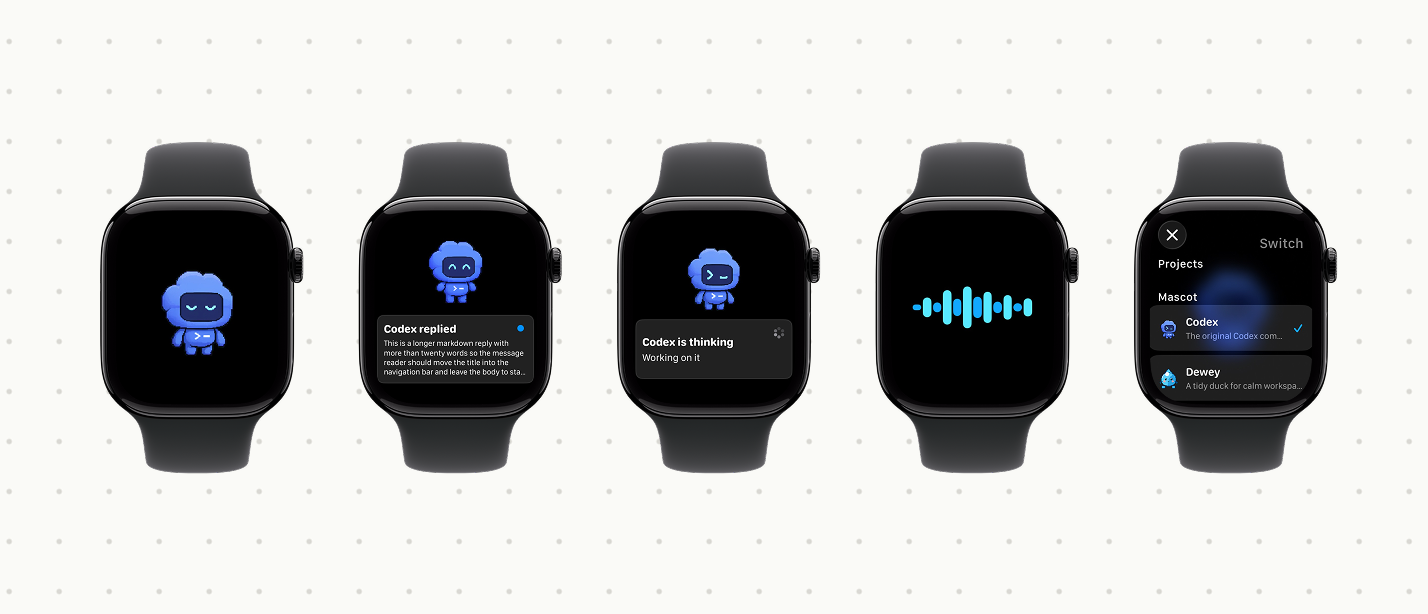 Codex Watch Companion preview