
Geminio
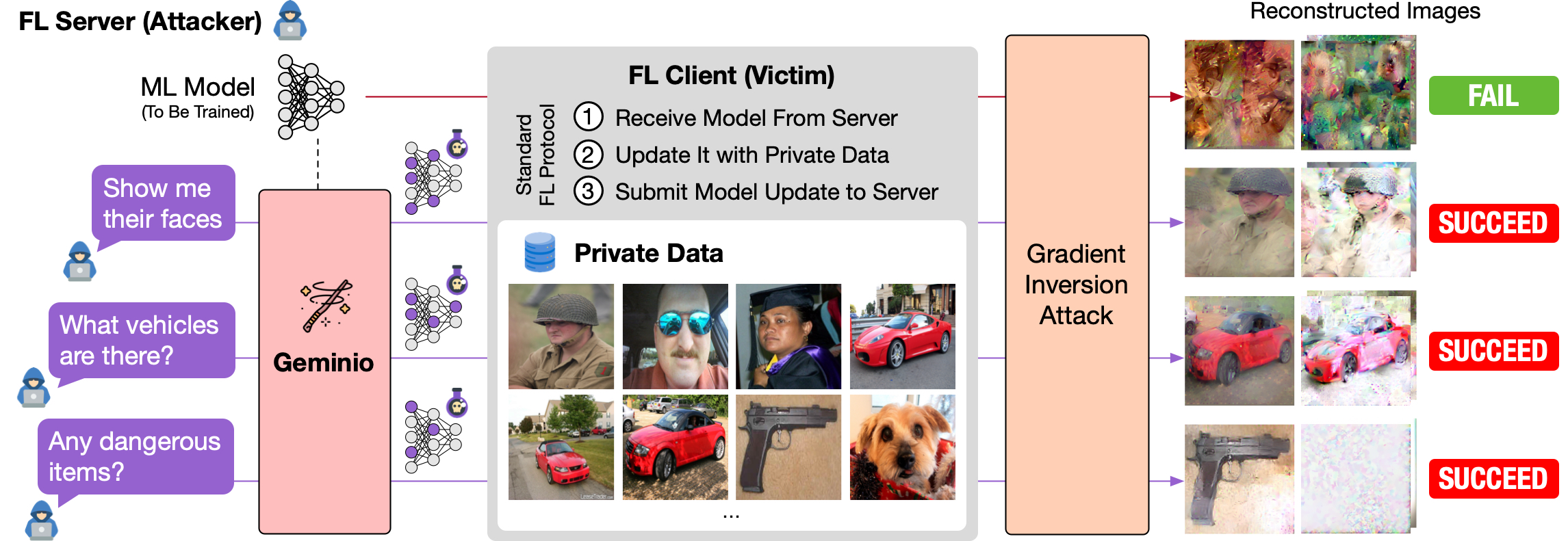
[ICCV 2025] Geminio is a VLM-powered gradient inversion attack in federated learning (FL). It allows the adversary (the FL server) to describe the data of value and reconstruct the victim client's private data matching the description.
File Explorer
- 1-339.jpg
- 10-882.jpg
- 100-111.jpg
- 101-680.jpg
- 102-143.jpg
- 103-838.jpg
- 104-510.jpg
- 105-357.jpg
- 106-298.jpg
- 107-585.jpg
- 108-554.jpg
- 109-326.jpg
- 11-141.jpg
- 110-81.jpg
- 111-935.jpg
- 112-142.jpg
- 113-110.jpg
- 114-550.jpg
- 115-397.jpg
- 116-390.jpg
- 117-927.jpg
- 118-425.jpg
- 119-318.jpg
- 12-807.jpg
- 120-964.jpg
- 121-326.jpg
- 122-838.jpg
- 123-358.jpg
- 124-329.jpg
- 125-438.jpg
- 126-628.jpg
- 127-397.jpg
- 128-336.jpg
- 13-550.jpg
- 14-357.jpg
- 15-885.jpg
- 16-116.jpg
- 17-964.jpg
- 18-18.jpg
- 19-826.jpg
- 2-763.jpg
- 20-146.jpg
- 21-746.jpg
- 22-928.jpg
- 23-733.jpg
- 24-128.jpg
- 25-115.jpg
- 26-141.jpg
- 27-438.jpg
- 28-692.jpg
- 29-613.jpg
- 3-413.jpg
- 30-631.jpg
- 31-356.jpg
- 32-141.jpg
- 33-916.jpg
- 34-298.jpg
- 35-393.jpg
- 36-858.jpg
- 37-617.jpg
- 38-679.jpg
- 39-83.jpg
- 4-413.jpg
- 40-551.jpg
- 41-749.jpg
- 42-927.jpg
- 43-964.jpg
- 44-140.jpg
- 45-909.jpg
- 46-141.jpg
- 47-82.jpg
- 48-334.jpg
- 49-357.jpg
- 5-808.jpg
- 50-128.jpg
- 51-631.jpg
- 52-550.jpg
- 53-812.jpg
- 54-16.jpg
- 55-785.jpg
- 56-146.jpg
- 57-326.jpg
- 58-336.jpg
- 59-666.jpg
- 6-451.jpg
- 60-558.jpg
- 61-328.jpg
- 62-111.jpg
- 63-170.jpg
- 64-378.jpg
- 65-688.jpg
- 66-103.jpg
- 67-115.jpg
- 68-464.jpg
- 69-357.jpg
- 7-457.jpg
- 70-688.jpg
- 71-326.jpg
- 72-141.jpg
- 73-334.jpg
- 74-865.jpg
- 75-510.jpg
- 76-935.jpg
- 77-23.jpg
- 78-816.jpg
- 79-551.jpg
- 8-357.jpg
- 80-146.jpg
- 81-964.jpg
- 82-509.jpg
- 83-16.jpg
- 84-80.jpg
- 85-631.jpg
- 86-517.jpg
- 87-271.jpg
- 88-585.jpg
- 89-534.jpg
- 9-357.jpg
- 90-631.jpg
- 91-744.jpg
- 92-111.jpg
- 93-935.jpg
- 94-334.jpg
- 95-631.jpg
- 96-357.jpg
- 97-140.jpg
- 98-942.jpg
- 99-334.jpg
- Any_females_riding_a_horse.jpg
- Any_guns.jpg
- Any_human_faces.jpg
- Any_jewelry.jpg
- Any_males_with_a_beard.jpg
- baseline.jpg
- intro-git.png
- original.jpg
- __init__.py
- analysis.py
- imprint_guarantee.py
- metrics.py
- README.md
- __init__.py
- augmentations.py
- common.py
- conv2circulant.py
- deepinversion.py
- make_functional.py
- objectives.py
- README.md
- recursive_attack.py
- ref128.pt
- regularizers.py
- __init__.py
- analytic_attack.py
- base_attack.py
- multiscale_optimization_attack.py
- optimization_based_attack.py
- optimization_permutation_attack.py
- optimization_with_label_attack.py
- README.md
- recursive_attack.py
- ref_res34.pt
- __init__.py
- nearest_embed.py
- VAE.py
- __init__.py
- cached_dataset.py
- data_preparation.py
- datasets_text.py
- datasets_vision.py
- lmdb_datasets.py
- wordlevel_tokenizer.py
- __init__.py
- analytic_transformer_utils.py
- classattack_utils.py
- feat_decoders.py
- imprint.py
- parameter_utils.py
- __init__.py
- densenets.py
- language_models.py
- losses.py
- model_preparation.py
- nfnets.py
- resnets.py
- transformer_dictionary.py
- utils.py
- vgg.py
- __init__.py
- README.md
- servers.py
- users.py
- __init__.py
- _default_optimization_attack.yaml
- hfgradinv.yaml
- LMDB.yaml
- none.yaml
- ImageNet.yaml
- ImageNetAnimals.yaml
- default.yaml
- honest-but-curious.yaml
- local_gradient.yaml
- local_updates.yaml
- multiuser_aggregate.yaml
- 11_geminio_imagenet.yaml
- __init__.py
- geminio_demo.yaml
- README.md
- custom.yaml
- __init__.py
- 11_geminio_cifar20.yaml
- 11_geminio_fer.yaml
- 11_geminio_imagenet.yaml
- __init__.py
- cfg.yaml
- README.md
- __init__.py
- README.md
- utils.py
- dataset.py
- models.py
- vlm.py
- __init__.py
- geminio_caltech256.py
- geminio_imagenet.py
- Any_females_riding_a_horse.pt
- Any_guns.pt
- Any_human_faces.pt
- Any_jewelry.pt
- Any_males_with_a_beard.pt
- .gitignore
- LICENSE
- main_breaching-imagenet.py
- main_geminio-imagenet.py
- README.md
- reconstruct.py
- requirements.txt
- test_pipeline_imagenet.sh
- vlm-imagenet-embed.py
# Use via CDN
jsDelivrjsDelivr serves any public GitHub repository as a CDN with zero setup. Pick a version and a file to get a ready-to-paste link and snippet.
Command Glossary
Commands referenced in this DOCs, explained below.
conda activate
View Details ▼
conda activate
Activate a conda environment.
See also: `conda deactivate`.
conda activate myenv
Activate an existing environment named `myenv`:
conda activate {{path/to/myenv}}
Activate an existing environment located at custom path:
conda activate --stack myenv
Stack `myenv` environment on top of a previous environment making libraries/commands/variables from both accessible:
conda create
View Details ▼
conda create
Create new conda environments.
conda create {{[-y|--yes]}} {{[-n|--name]}} py39 python=3.9 "numpy>=1.11" scipy
Create a new environment named `py39`, install Python 3.9, NumPy v1.11 or above in it, and the latest stable version of SciPy. Say yes to all confirmations:
conda create {{[-n|--name]}} myenv --file {{file1.yml}} --file {{file2.yml}}
Create a new environment named `myenv` and install packages listed in files:
conda create {{[-p|--prefix]}} {{path/to/myenv}}
Create a new environment at a custom path (i.e. prefix):
pip install
View Details ▼
pip install
Install Python packages.
pip install {{package1 package2 ...}}
Install one or more packages:
pip install {{package1 package2 ...}} {{[-U|--upgrade]}}
Upgrade all specified packages to the latest version, installing any that are not already present:
pip install {{package}}=={{version}}
Install a specific version of a package:
python
View Details ▼
python
Python language interpreter.
python
Start a REPL (interactive shell):
python {{path/to/file.py}}
Execute a specific Python file:
python -i {{path/to/file.py}}
Execute a specific Python file and start a REPL:
# Project Badges
-
 No description