
Geminio
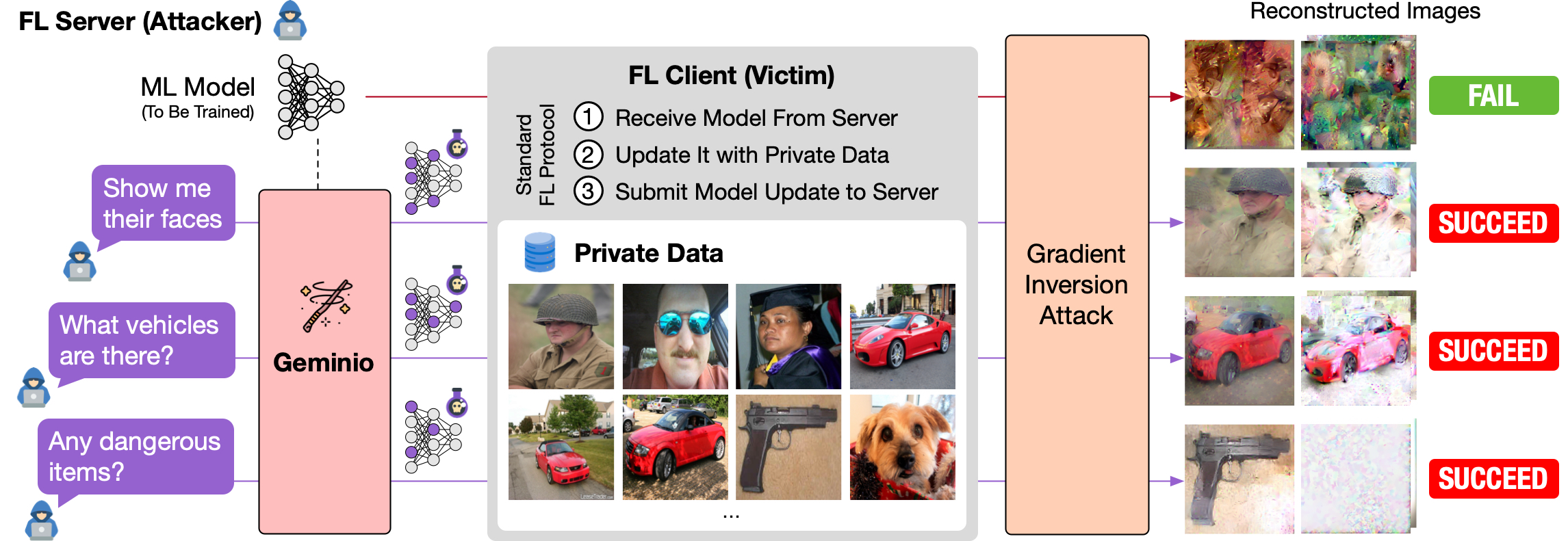
[ICCV 2025] Geminio is a VLM-powered gradient inversion attack in federated learning (FL). It allows the adversary (the FL server) to describe the data of value and reconstruct the victim client's private data matching the description.
파일 탐색기
- 1-339.jpg
- 10-882.jpg
- 100-111.jpg
- 101-680.jpg
- 102-143.jpg
- 103-838.jpg
- 104-510.jpg
- 105-357.jpg
- 106-298.jpg
- 107-585.jpg
- 108-554.jpg
- 109-326.jpg
- 11-141.jpg
- 110-81.jpg
- 111-935.jpg
- 112-142.jpg
- 113-110.jpg
- 114-550.jpg
- 115-397.jpg
- 116-390.jpg
- 117-927.jpg
- 118-425.jpg
- 119-318.jpg
- 12-807.jpg
- 120-964.jpg
- 121-326.jpg
- 122-838.jpg
- 123-358.jpg
- 124-329.jpg
- 125-438.jpg
- 126-628.jpg
- 127-397.jpg
- 128-336.jpg
- 13-550.jpg
- 14-357.jpg
- 15-885.jpg
- 16-116.jpg
- 17-964.jpg
- 18-18.jpg
- 19-826.jpg
- 2-763.jpg
- 20-146.jpg
- 21-746.jpg
- 22-928.jpg
- 23-733.jpg
- 24-128.jpg
- 25-115.jpg
- 26-141.jpg
- 27-438.jpg
- 28-692.jpg
- 29-613.jpg
- 3-413.jpg
- 30-631.jpg
- 31-356.jpg
- 32-141.jpg
- 33-916.jpg
- 34-298.jpg
- 35-393.jpg
- 36-858.jpg
- 37-617.jpg
- 38-679.jpg
- 39-83.jpg
- 4-413.jpg
- 40-551.jpg
- 41-749.jpg
- 42-927.jpg
- 43-964.jpg
- 44-140.jpg
- 45-909.jpg
- 46-141.jpg
- 47-82.jpg
- 48-334.jpg
- 49-357.jpg
- 5-808.jpg
- 50-128.jpg
- 51-631.jpg
- 52-550.jpg
- 53-812.jpg
- 54-16.jpg
- 55-785.jpg
- 56-146.jpg
- 57-326.jpg
- 58-336.jpg
- 59-666.jpg
- 6-451.jpg
- 60-558.jpg
- 61-328.jpg
- 62-111.jpg
- 63-170.jpg
- 64-378.jpg
- 65-688.jpg
- 66-103.jpg
- 67-115.jpg
- 68-464.jpg
- 69-357.jpg
- 7-457.jpg
- 70-688.jpg
- 71-326.jpg
- 72-141.jpg
- 73-334.jpg
- 74-865.jpg
- 75-510.jpg
- 76-935.jpg
- 77-23.jpg
- 78-816.jpg
- 79-551.jpg
- 8-357.jpg
- 80-146.jpg
- 81-964.jpg
- 82-509.jpg
- 83-16.jpg
- 84-80.jpg
- 85-631.jpg
- 86-517.jpg
- 87-271.jpg
- 88-585.jpg
- 89-534.jpg
- 9-357.jpg
- 90-631.jpg
- 91-744.jpg
- 92-111.jpg
- 93-935.jpg
- 94-334.jpg
- 95-631.jpg
- 96-357.jpg
- 97-140.jpg
- 98-942.jpg
- 99-334.jpg
- Any_females_riding_a_horse.jpg
- Any_guns.jpg
- Any_human_faces.jpg
- Any_jewelry.jpg
- Any_males_with_a_beard.jpg
- baseline.jpg
- intro-git.png
- original.jpg
- __init__.py
- analysis.py
- imprint_guarantee.py
- metrics.py
- README.md
- __init__.py
- augmentations.py
- common.py
- conv2circulant.py
- deepinversion.py
- make_functional.py
- objectives.py
- README.md
- recursive_attack.py
- ref128.pt
- regularizers.py
- __init__.py
- analytic_attack.py
- base_attack.py
- multiscale_optimization_attack.py
- optimization_based_attack.py
- optimization_permutation_attack.py
- optimization_with_label_attack.py
- README.md
- recursive_attack.py
- ref_res34.pt
- __init__.py
- nearest_embed.py
- VAE.py
- __init__.py
- cached_dataset.py
- data_preparation.py
- datasets_text.py
- datasets_vision.py
- lmdb_datasets.py
- wordlevel_tokenizer.py
- __init__.py
- analytic_transformer_utils.py
- classattack_utils.py
- feat_decoders.py
- imprint.py
- parameter_utils.py
- __init__.py
- densenets.py
- language_models.py
- losses.py
- model_preparation.py
- nfnets.py
- resnets.py
- transformer_dictionary.py
- utils.py
- vgg.py
- __init__.py
- README.md
- servers.py
- users.py
- __init__.py
- _default_optimization_attack.yaml
- hfgradinv.yaml
- LMDB.yaml
- none.yaml
- ImageNet.yaml
- ImageNetAnimals.yaml
- default.yaml
- honest-but-curious.yaml
- local_gradient.yaml
- local_updates.yaml
- multiuser_aggregate.yaml
- 11_geminio_imagenet.yaml
- __init__.py
- geminio_demo.yaml
- README.md
- custom.yaml
- __init__.py
- 11_geminio_cifar20.yaml
- 11_geminio_fer.yaml
- 11_geminio_imagenet.yaml
- __init__.py
- cfg.yaml
- README.md
- __init__.py
- README.md
- utils.py
- dataset.py
- models.py
- vlm.py
- __init__.py
- geminio_caltech256.py
- geminio_imagenet.py
- Any_females_riding_a_horse.pt
- Any_guns.pt
- Any_human_faces.pt
- Any_jewelry.pt
- Any_males_with_a_beard.pt
- .gitignore
- LICENSE
- main_breaching-imagenet.py
- main_geminio-imagenet.py
- README.md
- reconstruct.py
- requirements.txt
- test_pipeline_imagenet.sh
- vlm-imagenet-embed.py
# CDN으로 사용하기
jsDelivrjsDelivr는 공개 GitHub 리포지토리를 별도 설정 없이 CDN으로 즉시 서빙합니다. 버전과 파일을 고르면 웹페이지에 바로 붙일 수 있는 링크와 예시 코드가 만들어집니다.
명령어 용어집
이 문서에서 사용된 명령어를 모아봤습니다. 낯선 명령어가 있다면 펼쳐서 확인해보세요.
conda activate
설명 보기 ▼
conda activate
Activate a conda environment.
See also: `conda deactivate`.
conda activate myenv
Activate an existing environment named `myenv`:
conda activate {{path/to/myenv}}
Activate an existing environment located at custom path:
conda activate --stack myenv
Stack `myenv` environment on top of a previous environment making libraries/commands/variables from both accessible:
conda create
설명 보기 ▼
conda create
Create new conda environments.
conda create {{[-y|--yes]}} {{[-n|--name]}} py39 python=3.9 "numpy>=1.11" scipy
Create a new environment named `py39`, install Python 3.9, NumPy v1.11 or above in it, and the latest stable version of SciPy. Say yes to all confirmations:
conda create {{[-n|--name]}} myenv --file {{file1.yml}} --file {{file2.yml}}
Create a new environment named `myenv` and install packages listed in files:
conda create {{[-p|--prefix]}} {{path/to/myenv}}
Create a new environment at a custom path (i.e. prefix):
pip install
설명 보기 ▼
pip install
Install Python packages.
pip install {{package1 package2 ...}}
Install one or more packages:
pip install {{package1 package2 ...}} {{[-U|--upgrade]}}
Upgrade all specified packages to the latest version, installing any that are not already present:
pip install {{package}}=={{version}}
Install a specific version of a package:
python
설명 보기 ▼
python
Python 언어 인터프리터.
더 많은 정보: <https://docs.python.org/using/cmdline.html>.
python
REPL(대화형 셸) 시작:
python {{path/to/file.py}}
특정 Python 파일 실행:
python -i {{path/to/file.py}}
특정 Python 파일 실행 후 REPL 시작:
# 프로젝트 배지
-
 설명 없음
설명 없음