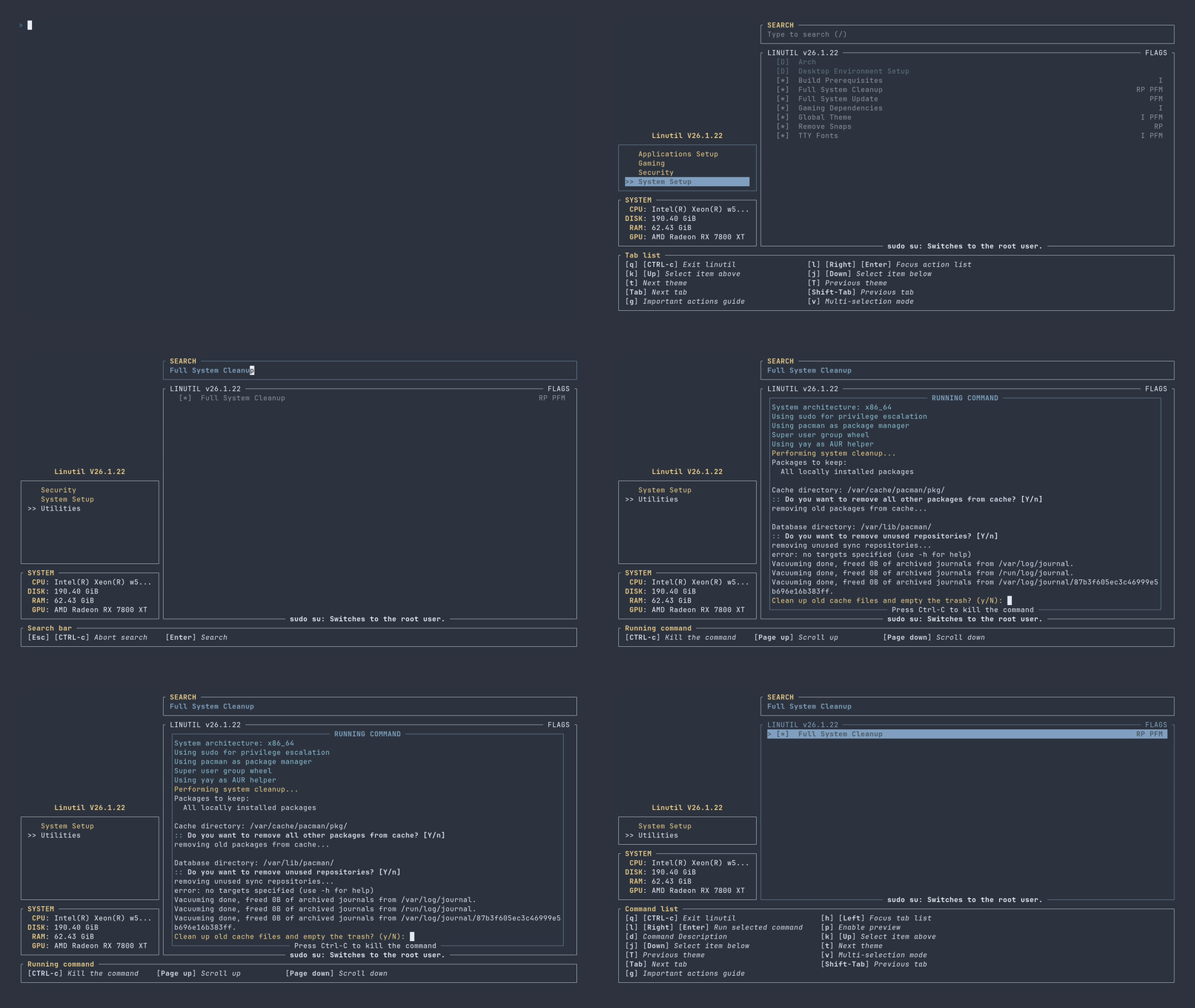
linutil
Chris Titus Tech의 Linux Toolbox인 Linutil은 일상적인 Linux 작업을 간소화하기 위해 설계된 배포판 독립형(distro-agnostic) 툴박스입니다.
파일 탐색기
- config.toml
- bug-reports.yml
- config.yml
- feature-reqests.yml
- bashisms.yml
- docs.yaml
- issue-slash-commands.yaml
- linutil.yml
- nix.yml
- pr-labels.yaml
- rust.yml
- shellcheck.yml
- typos.yml
- CODE_OF_CONDUCT.md
- CODEOWNERS
- CONTRIBUTING.md
- dependabot.yml
- FUNDING.yml
- preview.gif
- preview.tape
- PULL_REQUEST_TEMPLATE.md
- release.yml
- SECURITY.md
- config.rs
- inner.rs
- lib.rs
- brave-origin.sh
- brave.sh
- chromium.sh
- firefox.sh
- google-chrome.sh
- helium-browser.sh
- librewolf.sh
- lynx.sh
- thorium.sh
- tor-browser.sh
- vivaldi.sh
- waterfox.sh
- zen-browser.sh
- discord-setup.sh
- jitsi-setup.sh
- signal-setup.sh
- slack-setup.sh
- telegram-setup.sh
- thunderbird-setup.sh
- zapzap-setup.sh
- zoom-setup.sh
- ardour.sh
- audacity.sh
- blender.sh
- darktable.sh
- gimp.sh
- handbrake.sh
- inkscape.sh
- krita.sh
- mypaint.sh
- natron.sh
- obs-studio.sh
- olive.sh
- openshot.sh
- pinta.sh
- scribus.sh
- synfigstudio.sh
- tenacity.sh
- cursor.sh
- githubdesktop.sh
- jetbrains-toolbox.sh
- meld.sh
- neovim.sh
- ngrok.sh
- sublime.sh
- vscode.sh
- vscodium.sh
- zed.sh
- freeoffice.sh
- libreoffice.sh
- onlyoffice.sh
- wpsoffice.sh
- evince.sh
- okular.sh
- pdfstudio.sh
- pdfstudioviewer.sh
- alacritty-setup.sh
- android-debloat.sh
- auto-cpufreq.sh
- bottles-setup.sh
- dank-shell.sh
- docker-setup.sh
- fastfetch-setup.sh
- ghostty-setup.sh
- grub-theme.sh
- kitty-setup.sh
- linutil-installer.sh
- linutil-updater.sh
- mybash-setup.sh
- noctalia-shell.sh
- podman-compose-setup.sh
- podman-setup.sh
- rofi-setup.sh
- setup-flatpak.sh
- shelly-setup.sh
- tab_data.toml
- test-script-access.sh
- waydroid-setup.sh
- zsh-setup.sh
- bsnes.sh
- dolphin-emu.sh
- gopher64.sh
- melonds.sh
- mesen2.sh
- mgba.sh
- mupen64plus.sh
- ryujinx.sh
- snes9x.sh
- pcsx.sh
- pcsx2.sh
- play-emu.sh
- rpcs3.sh
- blastem.sh
- flycast.sh
- kronos.sh
- yabause.sh
- xemu.sh
- xenia.sh
- retroarch.sh
- arc-raiders-mod.sh
- common-steam-script.sh
- diablo2-titus-mod.sh
- eq-legends-midi-start.sh
- eq-legends-midi-stop.sh
- eq-legends-midi.sh
- fallout76-titus-mod.sh
- game-launchers.sh
- heroic-launcher.sh
- lutris-launcher.sh
- proton-tools.sh
- protonplus.sh
- protonup-qt.sh
- retroarch-launcher.sh
- starfield-titus-mod.sh
- steam-launcher.sh
- tab_data.toml
- firewalld-baselines.sh
- lynis-audit.sh
- tab_data.toml
- ufw-baselines.sh
- alpine-upgrade.sh
- cachyos-repos.sh
- chaotic-aur-setup.sh
- dwmtitus-setup.sh
- hyprland-kool.sh
- linux-neptune.sh
- nvidia-drivers.sh
- omarchy.sh
- pacman-config.sh
- paru-setup.sh
- server-setup.sh
- snapshot-setup.sh
- system-maintenance.sh
- virtualization.sh
- yay-setup.sh
- hyprland-kool-deb.sh
- configure-dnf.sh
- fedora-btrfs-assistant.sh
- fedora-upgrade.sh
- hyprland-kool-fed.sh
- multimedia-codecs.sh
- nvidia-proprietary-driver-setup.sh
- rpm-fusion-setup.sh
- virtualization.sh
- hyprland-kool-ubuntu24.sh
- compile-setup.sh
- desktop-environments-uninstall.sh
- desktop-environments.sh
- fstrim-setup.sh
- gaming-setup.sh
- global-theme.sh
- gpu-driver.sh
- pipewire-setup.sh
- remove-snaps.sh
- system-cleanup.sh
- system-update-topgrade.sh
- system-update.sh
- tab_data.toml
- terminus-tty.sh
- zram-setup.sh
- auto_detect_displays.sh
- change_orientation.sh
- disable_monitor.sh
- duplicate_displays.sh
- enable_monitor.sh
- extend_displays.sh
- manage_arrangement.sh
- reset_scaling.sh
- scale_monitor.sh
- set_brightness.sh
- set_primary_monitor.sh
- set_resolutions.sh
- install-cups.sh
- install-epson-printer-drivers.sh
- install-hp-printer-drivers.sh
- i3lock-on-lid-close.service
- add_to_group.sh
- add_user.sh
- change_password.sh
- delete_user.sh
- remove_from_group.sh
- auto-login.sh
- auto-mount.sh
- bluetooth-control.sh
- create-bootable-usb.sh
- encrypt_decrypt_tool.sh
- locale-setup.sh
- locale-us-setup.sh
- numlock.sh
- ollama.sh
- ramalama.sh
- samba-ssh-setup.sh
- service-control.sh
- ssh.sh
- tab_data.toml
- timeshift.sh
- utility_functions.sh
- wifi-control.sh
- common-script.sh
- common-service-script.sh
- tabs.toml
- Cargo.toml
- default.md
- favicon.png
- _index.md
- _index.md
- _index.md
- architecture.md
- _index.md
- _index.md
- _index.md
- _index.md
- _index.md
- _index.md
- _index.md
- walkthrough.md
- _index.md
- CONTRIBUTING.md
- faq.md
- KnownIssues.md
- en.yaml
- autolinks.html
- image.html
- .nojekyll
- android-chrome-192x192.png
- android-chrome-512x512.png
- apple-touch-icon.png
- CNAME
- favicon-16x16.png
- favicon-32x32.png
- favicon.ico
- favicon.svg
- site.webmanifest
- go.mod
- go.sum
- hugo.toml
- linutil.1
- default.nix
- shell.nix
- ctt.ico
- ctt_logo.png
- cli.rs
- confirmation.rs
- filter.rs
- float.rs
- floating_text.rs
- hint.rs
- logo.rs
- main.rs
- root.rs
- running_command.rs
- state.rs
- system_info.rs
- theme.rs
- tips.rs
- Cargo.toml
- cool_tips.txt
- docgen.rs
- main.rs
- path.rs
- Cargo.toml
- .gitignore
- .shellcheckrc
- _typos.toml
- AGENTS.md
- Cargo.lock
- Cargo.toml
- flake.lock
- flake.nix
- LICENSE
- linutil.desktop
- preview.sh
- publish-instructions.md
- publish.sh
- README.md
- rustfmt.toml
- sort-tomlfiles.sh
- SPEC.md
- start.sh
- startdev.sh
# 설치 가이드
rust- Rust & Cargo Latest Stable
- Curl
설치 및 실행 절차
curl -fsSL https://christitus.com/linux | sh
안정 버전의 Linutil을 스크립트로 다운로드하여 즉시 실행합니다.
cargo install linutil_tui
Cargo를 사용하여 Linutil 패키지를 직접 설치합니다.
linutil --config /path/to/example_config.toml
사용자 지정 TOML 설정 파일을 적용하여 Linutil을 실행합니다.
핵심 명령어
cargo install linutil_tui
Rust 패키지 관리자인 Cargo를 통해 linutil_tui를 빌드하고 설치합니다.
linutil --config /path/to/example_config.toml
지정된 TOML 설정 파일을 불러와 Linutil을 실행합니다.
linutil --help
Linutil의 사용 가능한 CLI 옵션과 도움말을 출력합니다.
# CDN으로 사용하기
jsDelivrjsDelivr는 공개 GitHub 리포지토리를 별도 설정 없이 CDN으로 즉시 서빙합니다. 버전과 파일을 고르면 웹페이지에 바로 붙일 수 있는 링크와 예시 코드가 만들어집니다.
명령어 용어집
이 문서에서 사용된 명령어를 모아봤습니다. 낯선 명령어가 있다면 펼쳐서 확인해보세요.
Alacritty
설명 보기 ▼
Alacritty
교차 플랫폼으로, GPU-가속 터미널 에뮬레이터.
더 많은 정보: <https://manned.org/alacritty>.
alacritty
새 Alacritty 창 열기:
alacritty --daemon
특정 디렉토리에서 실행:
alacritty msg create-window
새로운 Alacritty 창에서 명령어 실행:
cargo install
설명 보기 ▼
cargo install
Build and install a Rust binary.
cargo install {{package}}@{{version}}
Install a package from <https://crates.io> (the version is optional - latest by default):
cargo install --git {{repo_url}}
Install a package from the specified Git repository:
cargo install --git {{repo_url}} --{{branch|tag|rev}} {{branch_name|tag|commit_hash}}
Build from the specified branch/tag/commit when installing from a Git repository:
Fastfetch
설명 보기 ▼
Fastfetch
운영체제, 소프트웨어 및 하드웨어에 대한 정보 표시.
더 많은 정보: <https://manned.org/fastfetch>.
fastfetch
시스템 정보 표시:
fastfetch {{[-c|--config]}} all
모든 모듈과 함께 전체 시스템 정보 표시:
fastfetch {{[-c|--config]}} {{path/to/config_file}}
사용자 정의 구성 파일 로드:
git clone
설명 보기 ▼
git clone
Clone an existing repository.
git clone {{remote_repository_location}} {{path/to/directory}}
Clone an existing repository into a new directory (the default directory is the repository name):
git clone --recursive {{remote_repository_location}}
Clone an existing repository and its submodules:
git clone {{[-n|--no-checkout]}} {{remote_repository_location}}
Clone only the `.git` directory of an existing repository:
Kitty
설명 보기 ▼
Kitty
빠르고 기능이 풍부한 GPU 기반 터미널 에뮬레이터.
더 많은 정보: <https://sw.kovidgoyal.net/kitty/>.
kitty
새로운 터미널 열기:
kitty --title "{{title}}"
지정된 제목으로 창 열기:
kitty +kitten themes
테마 선택기 내장 기능 시작:
makepkg
설명 보기 ▼
makepkg
`pacman`과 함께 사용할 수 있는 패키지를 생성합니다.
기본적으로 현재 작업 디렉토리의 `PKGBUILD` 파일을 사용합니다.
더 많은 정보: <https://manned.org/makepkg>.
makepkg
패키지 생성:
makepkg {{[-s|--syncdeps]}}
패키지를 생성하고 의존성을 설치:
makepkg {{[-si|--syncdeps --install]}}
패키지를 생성하고 의존성을 설치한 다음 시스템에 설치:
paru
설명 보기 ▼
paru
AUR 헬퍼 및 pacman 래퍼.
관련 항목: `pacman`, `yay`.
더 많은 정보: <https://github.com/Morganamilo/paru#examples>.
paru {{package_name_or_search_term}}
패키지를 대화식으로 검색하고 설치:
paru
모든 패키지를 동기화하고 업데이트:
paru -Sua
AUR 패키지 업그레이드:
zypper
설명 보기 ▼
zypper
SUSE 및 openSUSE 패키지 관리 도구.
다른 패키지 관리자의 동등한 명령을 보려면 <https://wiki.archlinux.org/title/Pacman/Rosetta>.
더 많은 정보: <https://en.opensuse.org/SDB:Zypper_manual>.
sudo zypper {{[ref|refresh]}}
사용 가능한 패키지 및 버전 목록 동기화:
sudo zypper {{[in|install]}} {{package}}
새 패키지 설치:
sudo zypper {{[rm|remove]}} {{package}}
패키지 제거: