
VHLookup
Local-only Excel automation tool for public admin workflows
파일 탐색기
- vhlookup-local-main.jpg
- feature_01_privacy_masking.png
- feature_02_split_sheets.png
- feature_03_merge_files.png
- feature_04_before_after_validation.png
- feature_05_monthly_list.png
- feature_06_pivot_summary.png
- feature_07_custom_order_sort.png
- feature_08_merge_sheets.png
- VHLookup_User_Guide.pdf
- 01_privacy_masking.gif
- 02_split_sheets.gif
- 03_merge_files.gif
- 04_before_after_validation.gif
- 05_horizontal_table.gif
- 06_pivot_summary.gif
- 07_organization_order.gif
- 08_sheet_merge.gif
- VHLookup_brand_trailer.gif
- 01_privacy_masking.mp4
- 02_split_sheets.mp4
- 03_merge_files.mp4
- 04_before_after_validation.mp4
- 05_horizontal_table.mp4
- 06_pivot_summary.mp4
- 07_organization_order.mp4
- 08_sheet_merge.mp4
- brand_trailer_storyboard.md
- storyboard.md
- VHLookup_brand_trailer.mp4
- VHLookup_menu_walkthrough.mp4
- sample_catalog.md
- security_review_brief.md
- thread_launch_playbook.md
- threads_content_pack.md
- update_notes_2026-07-04.md
- citizen_service_requests.csv
- budget_execution.csv
- payment_requests.csv
- rate_reference.csv
- hr_employee_master.csv
- hr_training_completion.csv
- large_employee_master_10k.xlsx
- large_training_results_10k.xlsx
- department_status_a.csv
- department_status_b.csv
- gangbuk_school.csv
- gangnam_school.csv
- bad_school_a.csv
- bad_school_b.csv
- after_diagonal_changes_10k_50cols.csv
- before_10k_50cols.csv
- payment_after.csv
- payment_before.csv
- large_monthly_budget_wide_10k.csv
- monthly_budget_wide.csv
- budget_execution.csv
- department_tasks.csv
- monthly_budget_sheets.xlsx
- README.md
- capture_demo_video_poc.py
- capture_demo_videos.py
- capture_main_screenshot.py
- create_brand_trailer.py
- generate_user_guide_pdf.py
- render_readme_screenshots.py
- run_public_admin_demo.py
- __init__.py
- main.py
- tk_main.py
- __init__.py
- main.py
- __init__.py
- admin_tools.py
- auto.py
- consolidation.py
- excel_comments.py
- header.py
- horizontal.py
- inspection.py
- inspection_report.py
- keys.py
- loader.py
- mapper.py
- merge.py
- models.py
- normalization.py
- organization_order.py
- privacy.py
- privacy_masking.py
- reconciliation.py
- report.py
- settings.py
- sheet.py
- template_catalog.py
- templates.py
- validation.py
- version.py
- workbook_diff.py
- test_admin_tools.py
- test_cli.py
- test_consolidation_horizontal_report.py
- test_header.py
- test_mapper_merge.py
- test_organization_order.py
- test_privacy_masking.py
- test_public_admin_workflows.py
- test_workbook_diff.py
- .gitattributes
- .gitignore
- build_exe.bat
- install_desktop_deps.bat
- pyproject.toml
- README.md
- run_app.bat
- run_cli_examples.bat
- run_demo.bat
- 실행안내.md
# CDN으로 사용하기
jsDelivrjsDelivr는 공개 GitHub 리포지토리를 별도 설정 없이 CDN으로 즉시 서빙합니다. 버전과 파일을 고르면 웹페이지에 바로 붙일 수 있는 링크와 예시 코드가 만들어집니다.
링크
예시
명령어 용어집
이 문서에서 사용된 명령어를 모아봤습니다. 낯선 명령어가 있다면 펼쳐서 확인해보세요.
python
설명 보기 ▼
python
Python 언어 인터프리터.
더 많은 정보: <https://docs.python.org/using/cmdline.html>.
python
REPL(대화형 셸) 시작:
python {{path/to/file.py}}
특정 Python 파일 실행:
python -i {{path/to/file.py}}
특정 Python 파일 실행 후 REPL 시작:
# 프로젝트 배지
-
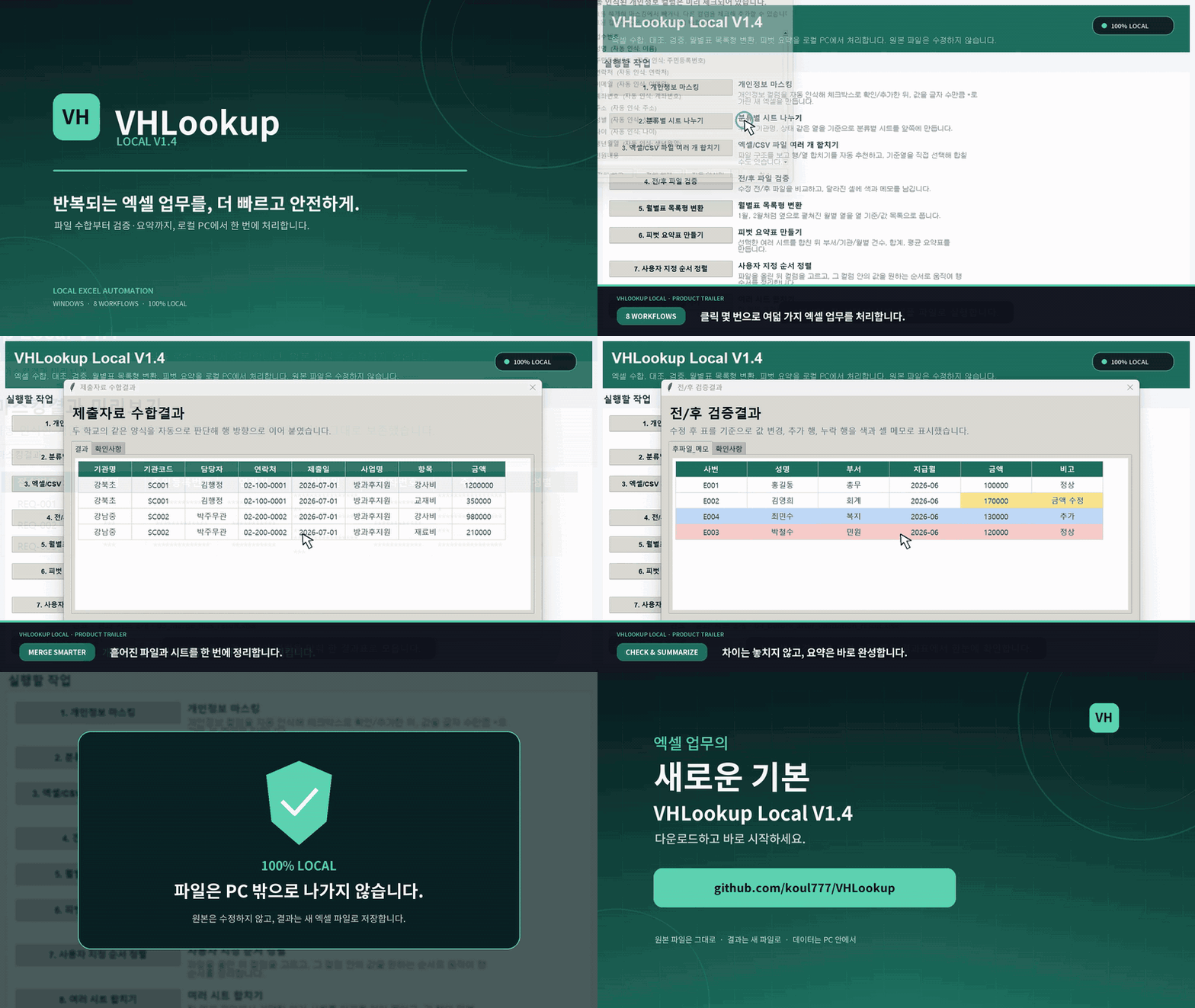 VHLookup Local 브랜드 트레일러
바로가기
VHLookup Local 브랜드 트레일러
바로가기
// repository documentation
Was this content helpful?
(0 ratings)