
Alexa-Shopping-List
Seamlessly manage your Alexa shopping list. Add, remove, and view items instantly. Interact with your Alexa shopping list via MCP, using AI assistants like Claude or Cursor.
File Explorer
- FUNDING.yml
- mcp.png
- alexa_api.py
- config.py
- main.py
- requirements.txt
- config.py
- login.py
- requirements.txt
- __init__.py
- config.py
- mcp_server.py
- requirements.txt
- __init__.py
- .gitignore
- docker-compose.yml
- Dockerfile
- LICENSE
- pyrightconfig.json
- README.md
# Use via CDN
jsDelivrjsDelivr serves any public GitHub repository as a CDN with zero setup. Pick a version and a file to get a ready-to-paste link and snippet.
Command Glossary
Commands referenced in this DOCs, explained below.
docker compose down
View Details ▼
docker compose down
Stop and remove containers, networks, images, and volumes created by `docker compose up`.
docker compose down
Stop and remove all containers and networks:
docker compose down --rmi all
Stop and remove containers, networks, and all images used by services:
docker compose down --rmi local
Stop and remove containers, networks, and only images without a custom tag:
docker compose logs
View Details ▼
docker compose logs
View output from containers in a Docker Compose application.
docker compose logs
View logs for all services:
docker compose logs {{service_name}}
View logs for a specific service:
docker compose logs {{[-f|--follow]}}
View logs and follow new output (like `tail --follow`):
docker compose up
View Details ▼
docker compose up
Start and run Docker services defined in a Compose file.
docker compose up
Start all services defined in the docker-compose file:
docker compose up {{[-d|--detach]}}
Start services in the background (detached mode):
docker compose up --build
Start services and rebuild images before starting:
pip install
View Details ▼
pip install
Install Python packages.
pip install {{package1 package2 ...}}
Install one or more packages:
pip install {{package1 package2 ...}} {{[-U|--upgrade]}}
Upgrade all specified packages to the latest version, installing any that are not already present:
pip install {{package}}=={{version}}
Install a specific version of a package:
python
View Details ▼
python
Python language interpreter.
python
Start a REPL (interactive shell):
python {{path/to/file.py}}
Execute a specific Python file:
python -i {{path/to/file.py}}
Execute a specific Python file and start a REPL:
uv pip
View Details ▼
uv pip
Provides pip-like commands for installing, uninstalling, and managing packages.
uv pip install {{package}}
Install a package:
uv pip install {{[-r|--requirements]}} {{requirements.txt}}
Install packages from a requirements file:
uv pip install {{package==1.2.3}}
Install a package with a specific version:
uv venv
View Details ▼
uv venv
Create an isolated Python environment for installing packages.
uv venv
Create a virtual environment in the default location (`.venv`):
uv venv {{path/to/venv}}
Create a virtual environment at a specific path:
uv venv {{[-p|--python]}} {{3.12}}
Create using a specific Python version:
# Project Badges
-
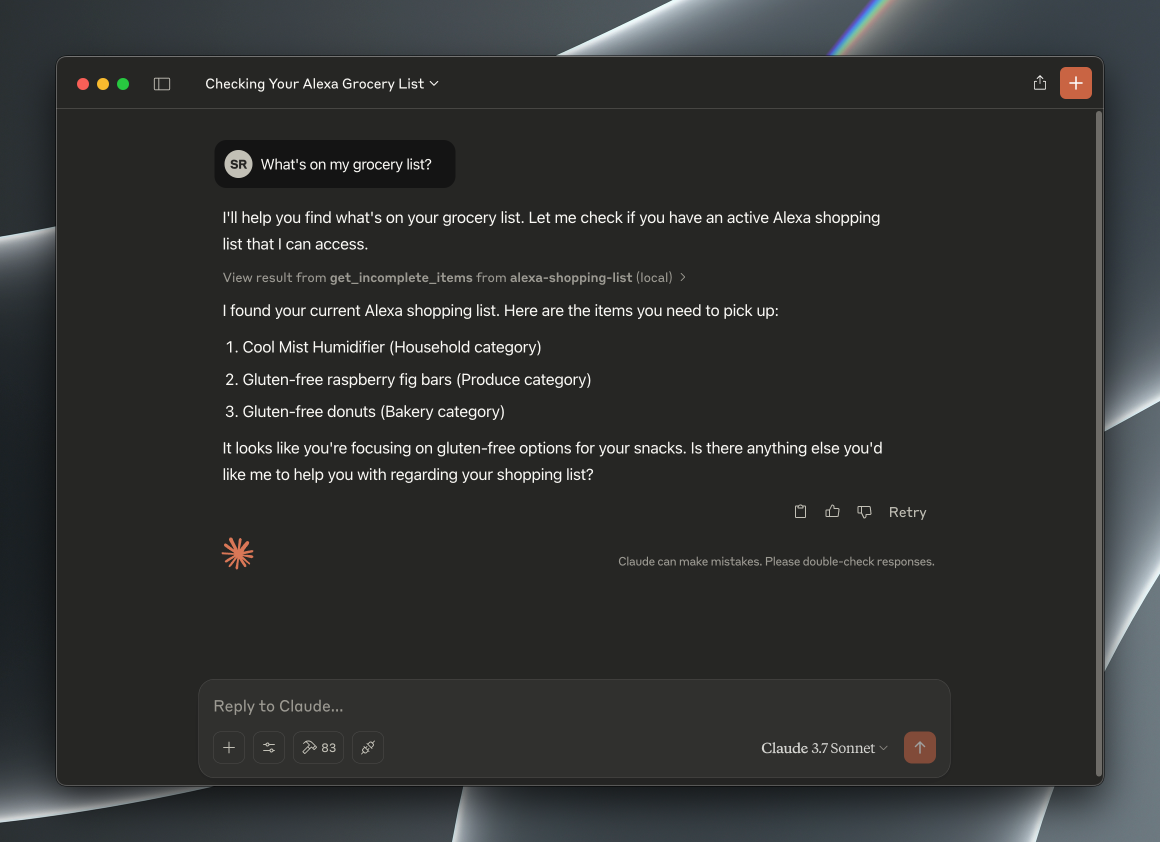 Example Usage in Claude Desktop