
codex-apple-watch
No description available.
파일 탐색기
- codex-watch-bridge.mjs
- AppIcon-100.png
- AppIcon-1024.png
- AppIcon-172.png
- AppIcon-196.png
- AppIcon-216.png
- AppIcon-48.png
- AppIcon-55.png
- AppIcon-80.png
- AppIcon-88.png
- Contents.json
- bsod-spritesheet-v4.png
- Contents.json
- codex-spritesheet-v4.png
- Contents.json
- Contents.json
- dewey-spritesheet-v4.png
- Contents.json
- fireball-spritesheet-v4.png
- Contents.json
- null-signal-spritesheet-v4.png
- Contents.json
- rocky-spritesheet-v4.png
- Contents.json
- seedy-spritesheet-v4.png
- Contents.json
- stacky-spritesheet-v4.png
- Contents.json
- BridgeMessage.swift
- CodexPetModel.swift
- CodexPetSpriteView.swift
- CodexWatchCompanionApp.swift
- CompanionRootView.swift
- CompanionViewModel.swift
- WatchAudioStreamer.swift
- WatchRuntimeKeeper.swift
- WatchSocketClient.swift
- CodexWatchCompanion.xcscheme
- project.pbxproj
- AudioLevelMeterTests.swift
- CompanionViewModelTests.swift
- MarkdownRendererTests.swift
- PetAnimationTests.swift
- CodexWatchCompanionUITests.swift
- Apple Design Resources License.rtf
- README.md
- apple-watch-series-11-42mm-jet-black-sport-band-official.png
- apple-watch-series-11-46mm-jet-black-sport-band-official.png
- group-9.png
- .gitkeep
- 01-idle-pet.jpg
- 02-thinking.jpg
- 03-voice-waveform.jpg
- 04-unread-reply-card.jpg
- 05-message-reader.jpg
- 06-picker.jpg
- install.sh
- run-bridge-supervisor.sh
- bridge.e2e.test.mjs
- .gitignore
- CodexWatchCompanion-Info.plist
- package.json
- README.md
# CDN으로 사용하기
jsDelivrjsDelivr는 공개 GitHub 리포지토리를 별도 설정 없이 CDN으로 즉시 서빙합니다. 버전과 파일을 고르면 웹페이지에 바로 붙일 수 있는 링크와 예시 코드가 만들어집니다.
명령어 용어집
이 문서에서 사용된 명령어를 모아봤습니다. 낯선 명령어가 있다면 펼쳐서 확인해보세요.
codex
설명 보기 ▼
codex
OpenAI로 구동되는 터미널용 자연어 코드 어시스턴트.
요청을 수행하기 위해 현재 디렉터리의 파일을 읽고 수정.
더 많은 정보: <https://developers.openai.com/codex/cli/reference>.
codex
현재 디렉터리에서 대화형 Codex 세션을 시작:
codex "{{prompt}}"
프롬프트를 사용해 단일 Codex 명령을 실행:
codex --sandbox workspace-write "{{prompt}}"
프롬프트를 전체 자동 모드로 실행:
npm run
설명 보기 ▼
npm run
Run a script.
npm run
List available scripts:
npm run {{script_name}}
Run a script:
npm run {{script_name}} -- {{argument}} {{--option}}
Pass arguments to a script:
tmux
설명 보기 ▼
tmux
터미널 멀티플렉서.
tmux는 단일 단말기 창 또는 원격 터미널 세션 안에서 여러 세션을 사용할 수 있도록 도와줍니다.
관련 항목: `zellij`, `screen`.
더 많은 정보: <https://github.com/tmux/tmux>.
tmux
새 세션 시작:
tmux {{[new|new-session]}} -s {{name}}
이름있는 새 세션 시작:
tmux {{[ls|list-sessions]}}
세션 리스트 출력:
xcodebuild
설명 보기 ▼
xcodebuild
Xcode 프로젝트 빌드.
더 많은 정보: <https://developer.apple.com/library/archive/technotes/tn2339/_index.html>.
xcodebuild -workspace {{workspace_name.workspace}} -scheme {{scheme_name}} -configuration {{configuration_name}} clean build SYMROOT={{SYMROOT_path}}
워크스페이스 빌드:
xcodebuild -target {{target_name}} -configuration {{configuration_name}} clean build SYMROOT={{SYMROOT_path}}
프로젝트 빌드:
xcodebuild -showsdks
SDK 표시:
xcrun
설명 보기 ▼
xcrun
개발 도구 및 속성을 실행하거나 찾습니다.
더 많은 정보: <https://keith.github.io/xcode-man-pages/xcrun.1.html>.
xcrun {{tool}} {{arguments}}
활성 개발자 디렉토리에서 도구를 찾고 실행:
xcrun {{tool}} {{arguments}} --verbose
자세한 출력 표시:
xcrun --sdk {{sdk_name}}
주어진 SDK에 대한 도구 찾기:
# 프로젝트 배지
-
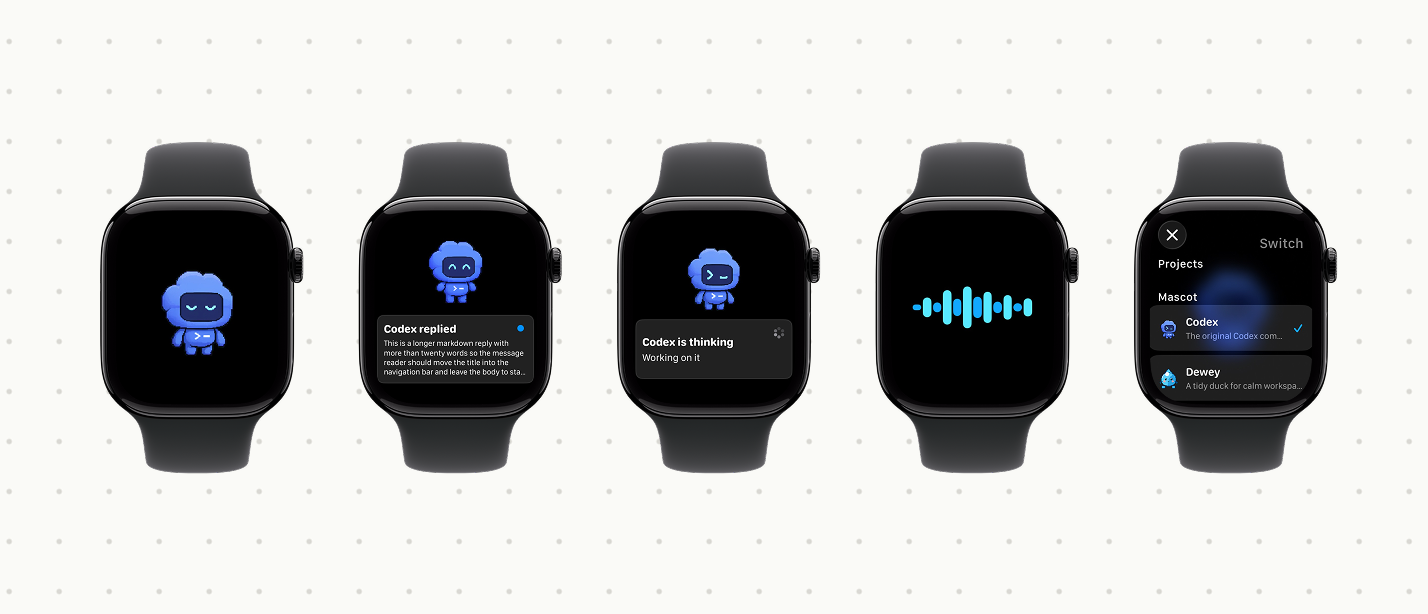 Codex Watch Companion preview